We had similar issue from the MX's on this feature. you may need to add a HTTP external Proxy for this type of external access process:
MX-> ADMIN --> System Definitions --> External HTTP Settings (add PROXY information with the Proxy host/port information).
Original Message:
Sent: 09-19-2025 06:02
From: Joy Ampitan
Subject: ADC Download Page Shows "www.imperva.com Refused to Connect"
Hello Cezmi,
Thanks for the guidance. What should I do after getting this output?
That said, I'd also like to mention that the issue has already been resolved - I was able to find the fix using this Imperva document:
https://docs-cybersec.thalesgroup.com/bundle/z-kb-articles-knowledgebase-support/page/515768321.html
I really appreciate your help and support throughout this. 🙏
Best regards,
------------------------------
Joy Ampitan
Security Engineer
Ethnos Cyber Limited
Lagos
------------------------------
Original Message:
Sent: 09-18-2025 04:24
From: Cezmi Cal
Subject: ADC Download Page Shows "www.imperva.com Refused to Connect"
hello Joy,
you should login to MX via SSH, then switch to root account and run "ll /opt/SecureSphere/server/SecureSphere/jakarta-tomcat-secsph/webapps/SecureSphere/WEB-INF/am_lib/" command. You should see the output like below

------------------------------
Cezmi Cal
Consultant
Barikat Internet Guvenligi Bilisim Ticaret A.S.
Ankara
Original Message:
Sent: 09-18-2025 03:56
From: Joy Ampitan
Subject: ADC Download Page Shows "www.imperva.com Refused to Connect"
Hello Cezmi,
This was the ouput of the command 'https://www.imperva.com/adc/110/content/'
------------------------------
Joy Ampitan
Security Engineer
Ethnos Cyber Limited
Lagos
Original Message:
Sent: 09-16-2025 04:23
From: Cezmi Cal
Subject: ADC Download Page Shows "www.imperva.com Refused to Connect"
Hi Joy,
Can you share the output of "ll /opt/SecureSphere/server/SecureSphere/jakarta-tomcat-secsph/webapps/SecureSphere/WEB-INF/am_lib/" command on MX?
------------------------------
Cezmi Cal
Consultant
Barikat Internet Guvenligi Bilisim Ticaret A.S.
Ankara
Original Message:
Sent: 09-15-2025 11:02
From: Joy Ampitan
Subject: ADC Download Page Shows "www.imperva.com Refused to Connect"
Yes Cezmi, that's correct
------------------------------
Joy Ampitan
Security Engineer
Ethnos Cyber Limited
Lagos
Original Message:
Sent: 09-15-2025 09:55
From: Cezmi Cal
Subject: ADC Download Page Shows "www.imperva.com Refused to Connect"
Hello Joy,
Your product is DAM and your MX has a not-expired/valid license, right?
------------------------------
Cezmi Cal
Consultant
Barikat Internet Guvenligi Bilisim Ticaret A.S.
Ankara
Original Message:
Sent: 09-15-2025 09:47
From: Joy Ampitan
Subject: ADC Download Page Shows "www.imperva.com Refused to Connect"
Hello Cezmi,
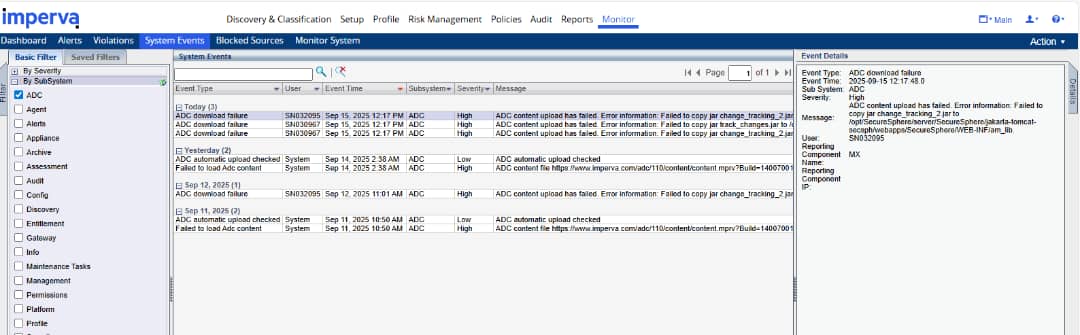
I tried uploading the file downloaded from the link provided, but I encountered an error. Please check the attached screenshots for reference.
Thank you.
Best regards,
------------------------------
Joy Ampitan
Security Engineer
Ethnos Cyber Limited
Lagos
Original Message:
Sent: 09-15-2025 05:21
From: Cezmi Cal
Subject: ADC Download Page Shows "www.imperva.com Refused to Connect"
You can download latest ADC file from this link: https://www.imperva.com/dam-adc/110/content/content.mprv
The ADC path was changed in March, and this change reflects GUI when you upgrade the MX to 14.7.1.50 or later.
------------------------------
Cezmi Cal
Consultant
Barikat Internet Guvenligi Bilisim Ticaret A.S.
Ankara
Original Message:
Sent: 09-15-2025 04:15
From: Joy Ampitan
Subject: ADC Download Page Shows "www.imperva.com Refused to Connect"
Hello Cal,
The MX version is 14.7.1.20
------------------------------
Joy Ampitan
Security Engineer
Ethnos Cyber Limited
Lagos
Original Message:
Sent: 09-12-2025 08:08
From: Cezmi Cal
Subject: ADC Download Page Shows "www.imperva.com Refused to Connect"
Hi Joy,
Which version of MX do you see this error?
------------------------------
Cezmi Cal
Consultant
Barikat Internet Guvenligi Bilisim Ticaret A.S.
Ankara