Hi All,
I recently came across a feature in Imperva CWAF that allows extraction of detailed site statistics across all sub‑accounts and complete site counts, providing granular updates for the past week.
The report includes:
-
Data Transfer
-
Human Visits
-
Bot Visits
-
WAF Sessions
-
Rule Hits
-
CAPTCHA Challenges
-
Status
-
Creation Date
This capability is highly valuable for understanding traffic trends and potential attack vectors targeting our assets. It also provides a comprehensive view of overall site activity and security posture.
Step 1 : Login Imperva CWAF
Step 2 : Go to Root Account
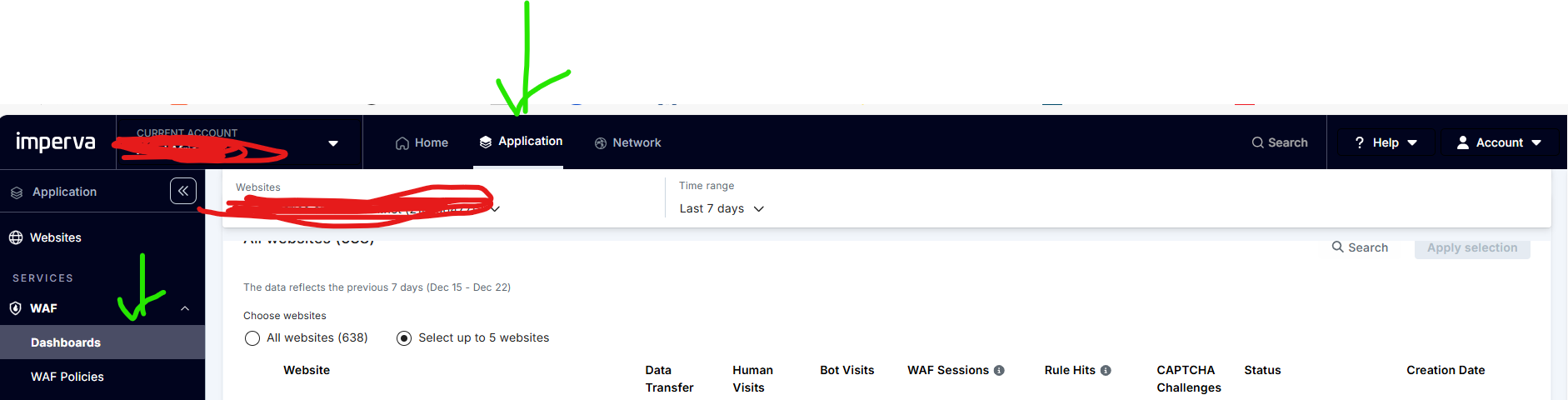
Step 3 : Click Application Tab in the top Horizontal Menu
Step 4 : Go to Services (Left Panel) Expand WAF option -> Then click Dashboards
Step 5 : Scroll Down to bottom of the page and you can find the complete information
Note: The data/stats is only for past 1 week.
#CloudWAF(formerlyIncapsula)------------------------------
Gopalakrishnan Manisekaran
Senior Manager
Bharti Airtel Ltd
Gurgoan
------------------------------