Hi Aloysius,
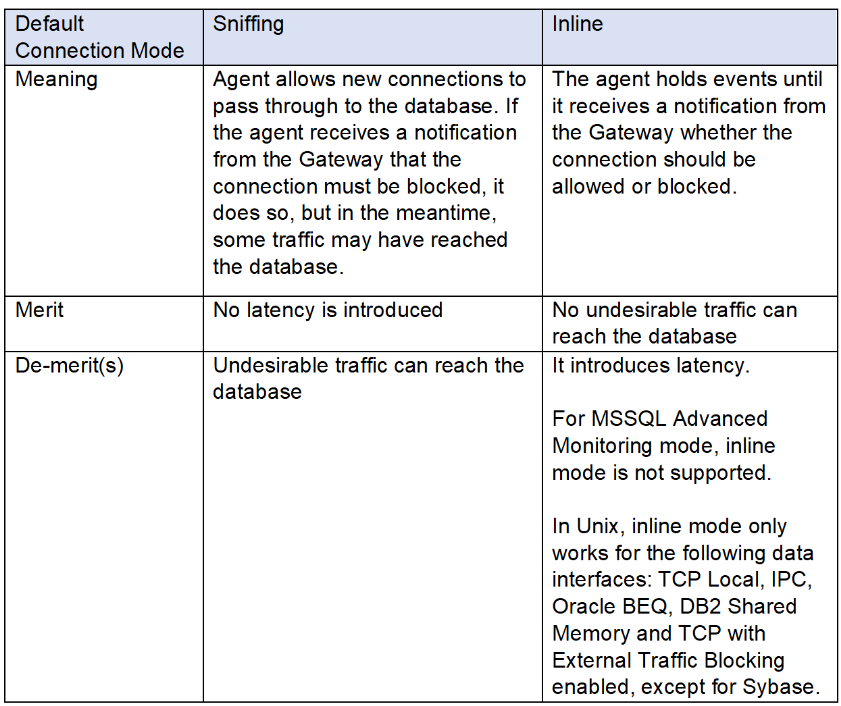
We can see that you are using Inline connection mode along with MSSQL Advanced Monitoring mode in the agent configurations.
We hope that you have gone through the response (https://community.imperva.com/discussion/reaarrange-custom-security-poliicly?ReturnUrl=%2fcommunities%2fcommunity-home%2fdigestviewer%3fcommunitykey%3d39c6092a-d67a-4bc2-8134-bfbb25fc43af) or link (https://docs-cybersec.thalesgroup.com/bundle/v14.19-dam-user-guide/page/65699.htm and https://docs-cybersec.thalesgroup.com/bundle/v14.19-dam-user-guide/page/63714.htm) wherein it is mentioned - In MSSQL Advanced Mode, inline mode is not supported. The only blocking option is in sniffing mode. In sniffing mode, for blocking to work, configure the Security Policy so that its Followed Action is either Short IP Block, Long IP Block, Short User Block, or Long User Block, only.
Also, kindly go through the community discussion thread (https://community.imperva.com/communities/community-home/digestviewer/viewthread?MessageKey=90f7079c-f6f9-4fdc-a830-09ad67ee561b&CommunityKey=39c6092a-d67a-4bc2-8134-bfbb25fc43af&pk_vid=1761329692635e2d#bm90f7079c-f6f9-4fdc-a830-09ad67ee561b) for more information.

Regards,
------------------------------
SBISOC 4430
Manager
Mumbai
------------------------------