Thank you, I appreciate everyone's help.
I didn't need to restore any backups, however, We upgraded our MX from 14.7.1.20 to 14.7.1.131. The patch installation finished successfully, but after rebooting the MX, the main services did not start automatically.
After the reboot, impctl status showed something like this:
database-server configured,created,not-listening,not-running
management-server not-running
watchdog not-running
We waited a few minutes, but the services remained stopped. We then started them manually using:
impctl db start
impctl server start
impctl watchdog start
After that, everything came up correctly:
database-server configured,created,listening,running
management-server running,Ready
watchdog running
The MX is currently up and working fine, but we tested another reboot and the same behavior happened again: the services did not start automatically and had to be started manually.
Has anyone seen this behavior before after applying patch 14.7.1.131 or after rebooting an MX on version 14.7?
I would like to understand if this is expected behavior in some cases, or if there is something I should check or correct so the DB, management-server, and watchdog services start automatically after a normal reboot. (Of course I have a support case, but I'd like to check with you if you've encountered any similar behavior)
Any suggestions or guidance would be greatly appreciated.
Thanks in advance!
------------------------------
Javier Carmona Baeza
Support Team
Kio Networks S.A. de C.V.
Mexico City
------------------------------
Original Message:
Sent: 05-21-2026 05:47
From: Colm DYNES_IMP
Subject: Step-by-Step Patch Installation Procedure
Hi Javier, the rollback plan depends on your environment:
If it is deployed in VM, take a snapshot of the MX and GWs before attempting to upgrade.
If it is Hardware, then this will require a reimage of the device if the upgrade fails:
- For Hardware GW I would recommend having a USB device built with the upgrade target version installed
- https://docs-cybersec.thalesgroup.com/bundle/v15.5-waf-administration-guide/page/7228.htm
- https://docs-cybersec.thalesgroup.com/bundle/v15.5-waf-administration-guide/page/7226.htm
- For Hardware MX - ensure that a backup is taken prior to performing the upgrade or if it is a major release upgrade, ensure you have the upgraded back up from the Upgrade Validation request:
- https://docs-cybersec.thalesgroup.com/bundle/z-kb-articles-knowledgebase-support/page/290231128.html
- You can either reinstall the MX at the original version and import the saved export
- Or reinstall MX at target upgraded version and import the Upgraded Export from the Upgrade Validation
- https://docs-cybersec.thalesgroup.com/bundle/v15.5-waf-administration-guide/page/7228.htm
- https://docs-cybersec.thalesgroup.com/bundle/v15.5-waf-administration-guide/page/7226.htm
- https://docs-cybersec.thalesgroup.com/bundle/z-kb-articles-knowledgebase-support/page/290591125.html
Hopefully this information helps.
------------------------------
Colm DYNES_IMP
Support User
DataHolder
------------------------------
Original Message:
Sent: 05-19-2026 15:58
From: Javier Carmona Baeza
Subject: Step-by-Step Patch Installation Procedure
Thank you all for your support. One more thing...
In my experience, applying a patch to Imperva systems is quite consistent and error-free. Even if errors do occur, the changes are reverted, leaving the original environment stable and functioning.
However, the client is very sensitive and is requesting a work plan that includes a rollback or fresh install in case of errors. Could you also suggest a step-by-step guide for recovering my MX or GW in case I need to restore it from my backups?
------------------------------
Javier Carmona Baeza
Support Team
Kio Networks S.A. de C.V.
Mexico City
Original Message:
Sent: 05-14-2026 00:19
From: SBISOC 4430
Subject: Step-by-Step Patch Installation Procedure
Hi Javier,
That page requires login.
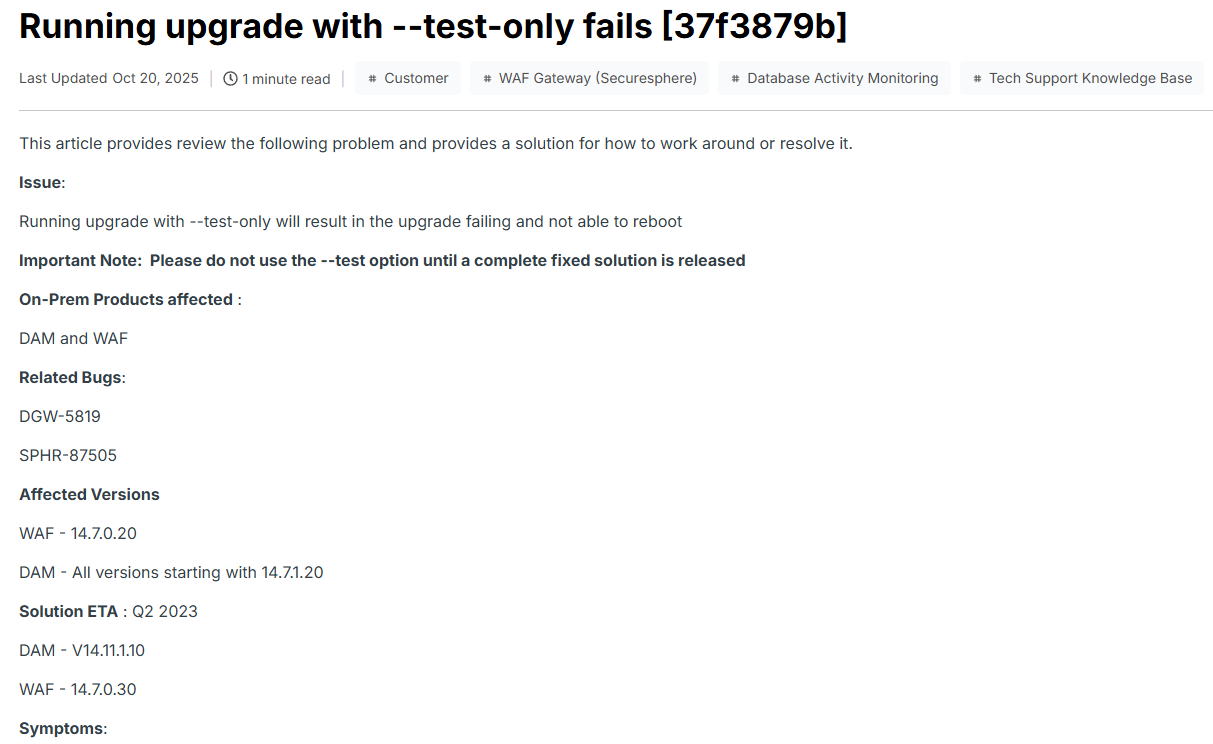
Regards,
------------------------------
SBISOC 4430
Manager
Mumbai
Original Message:
Sent: 05-13-2026 13:37
From: Javier Carmona Baeza
Subject: Step-by-Step Patch Installation Procedure
Hi,
Here it is!
But I don't have the necessary permissions to view the second page you provided. I'll try the instructions from the first one you shared.
Thank you so much!
------------------------------
Javier Carmona Baeza
Support Team
Kio Networks S.A. de C.V.
Mexico City
Original Message:
Sent: 05-13-2026 12:10
From: SBISOC 4430
Subject: Step-by-Step Patch Installation Procedure
Hi Javier,
You may please refer to the links: https://docs-cybersec.thalesgroup.com/bundle/v14.7-dam-upgrade-guide/page/57837.htm and https://docs-cybersec.thalesgroup.com/bundle/z-kb-articles-knowledgebase-support/page/290558993.html?pk_vid=1778685992e8cfa31778688537e8cfa3
Regards,
------------------------------
SBISOC 4430
Manager
Mumbai
Original Message:
Sent: 05-12-2026 20:12
From: Javier Carmona Baeza
Subject: Step-by-Step Patch Installation Procedure
Thanks, Alex.
Also, I remember there's an option to run it and only check the prerequisites, right? If so, what's the parameter?
Thank you!!!!
------------------------------
Javier Carmona Baeza
Support Team
Kio Networks S.A. de C.V.
Mexico City
Original Message:
Sent: 05-12-2026 17:38
From: Alejandro Hernandez (OCPM)
Subject: Step-by-Step Patch Installation Procedure
You will follow the instructions of this link
https://docs-cybersec.thalesgroup.com/bundle/v14.7-dam-release-notes/page/59340.htm
------------------------------
Alejandro Hernandez
SICAP
Professional Services Consultant and Principal Technical Trainer
Mexico City